Portfolio execution
Project Portfolio Dashboard for Executives: Examples, Bottlenecks, and Resource Constraints
A guide to executive project portfolio dashboards that show status, goals, bottlenecks, resource constraints, task flow, and where leadership should focus.
Key takeaways
- A project portfolio dashboard should show more than status. It should show where constrained capacity is being consumed.
- Executives need goal linkage, task evidence, owner workload, and bottleneck signals in the same review.
- Commandix helps leaders decide which projects deserve attention, which should pause, and which constraint to protect.
A project portfolio dashboard for executives should answer a painful question: which projects deserve scarce leadership and team capacity right now? Most portfolio dashboards show status, owner, due date, and maybe budget. That is useful, but it is not enough. The executive problem is not seeing a list of projects. The problem is deciding where constrained capacity should go.
Companies rarely fail because they have no projects. They fail because they start too many. Each initiative looks reasonable in isolation. Together, they create a queue that the system cannot absorb. Shared specialists, reviewers, sales engineers, product leaders, and operations teams become overloaded. Then everything is active, nothing is truly protected, and the portfolio turns into a polite traffic jam.
What executives need from a portfolio dashboard
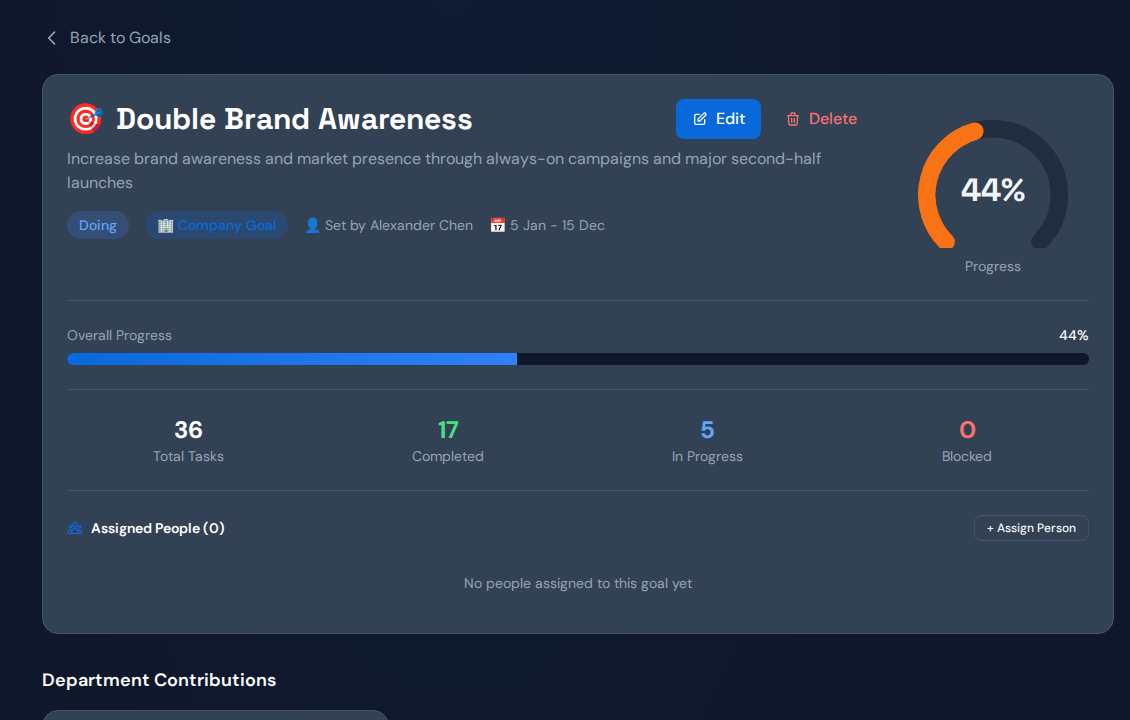
Executives need a view that connects strategy to work. A project is not important because it has a confident title. It is important because it moves a strategic goal, protects revenue, removes a constraint, or creates a capability the company needs. If a dashboard does not show that link, leadership will rank projects by loudest sponsor or latest escalation.
| Dashboard layer | What it shows | Why executives need it |
|---|---|---|
| Portfolio status | Active, planned, paused, done, late. | Shows the surface health of initiatives. |
| Goal linkage | Which strategic result the project supports. | Prevents low-value projects from consuming attention. |
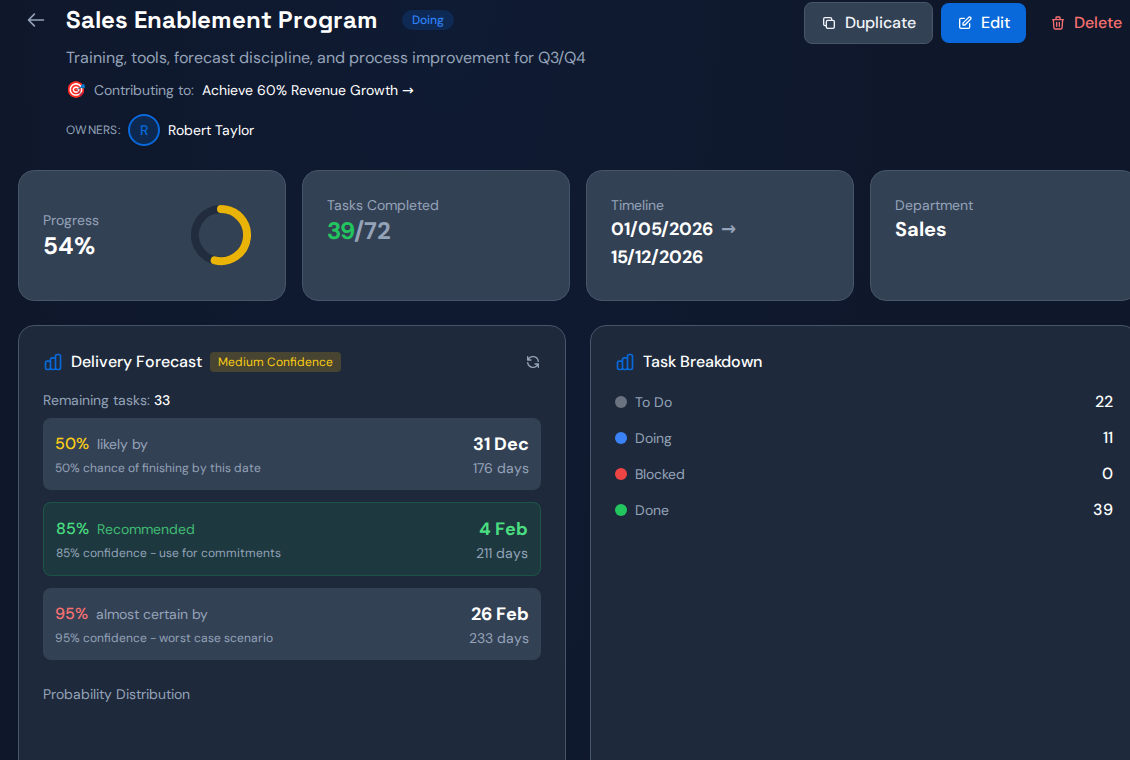
| Task flow | Planned, active, blocked, done work. | Reveals the work behind the status. |
| Owner workload | Shared resource pressure and active assignments. | Shows whether the portfolio is overfeeding a constraint. |
| Constraint action | Exploit, subordinate, elevate decisions. | Turns review into operating movement. |
Why project portfolios create bottlenecks
Portfolio bottlenecks usually appear when demand is started faster than the system can finish. The visible symptom is late projects. The real constraint may be a specific role, approval path, dependency, or cross-functional team. When leaders only ask "what is the status?" they miss the deeper question: what shared constraint is causing several projects to slow down at the same time?
If every project is active, the portfolio may be optimized for political comfort instead of throughput. The constraint pays the price.
Commandix makes this easier to see because projects do not sit alone. They connect to tasks, owners, units, goals, and constraints. If several projects depend on the same person or team, workload and constraint analysis will expose that pattern. The leadership team can then decide whether to pause lower-value work, protect the constrained owner, or elevate capacity.
Example executive portfolio workflow
Start on the projects page. Scan active initiatives, ownership, and health. Then open the task evidence behind the projects that matter most. Look for blocked work, overdue work, or repeated dependency waits. Next, check whether those projects connect to priority goals. Finally, open constraint analysis and workload. If a single resource or team appears behind multiple project delays, that is the operating target.
Which projects are red, yellow, or green?
Which tasks, owners, and blockers explain the status?
Which shared limit is slowing the portfolio?
Portfolio dashboard vs project management tool
| Need | Typical PM tool | Commandix |
|---|---|---|
| Task organization | Strong. | Strong, with executive context. |
| Strategic goal connection | Often optional. | Core operating layer. |
| Shared constraint detection | Usually manual. | Constraint and workload views show it. |
| Executive action | Meeting notes or comments. | Exploit, subordinate, elevate actions. |
| Portfolio prioritization | Often subjective. | Grounded in goal impact and constraint evidence. |
The portfolio prioritization rule
The right question is not "which project is important?" Many projects are important. The better question is "which project should receive constrained capacity next?" That question forces tradeoffs. It also protects the team from the common executive habit of approving everything and acting surprised when throughput collapses.
Portfolio review checklist
- Which projects directly support active strategic goals?
- Which projects are blocked by the same owner, team, or dependency?
- Which active projects should be paused to protect the constraint?
- Which project has the highest blocked business value?
- Which action will improve throughput before the next review?
How Commandix changes the meeting
In a normal portfolio meeting, every owner defends their project. In a Commandix portfolio review, the conversation moves to system leverage. The dashboard shows the portfolio. Tasks show execution evidence. Goals show value. Constraint analysis shows the limiting point. Actions show what leadership will do. The meeting becomes less performative and more useful.
What a good portfolio dashboard prevents
First, it prevents stealth overload. When too many initiatives are active, the damage often appears as scattered lateness rather than one obvious crisis. A dashboard that shows workload and task flow helps leaders see overload before teams burn out or customers feel the delay. It also gives managers a defensible reason to say no, pause, or sequence work.
Second, it prevents strategy drift. Projects tend to keep living after their strategic reason has weakened. If the portfolio dashboard connects each project to goals, leaders can ask whether the project still deserves capacity. This is uncomfortable, but valuable. The best way to free capacity is often to stop funding work that no longer moves the goal.
Third, it prevents fake certainty. A project can look green because the owner is optimistic, while tasks and dependencies tell a different story. Commandix grounds portfolio review in execution evidence. That does not remove judgment. It gives judgment something real to stand on.
When to pause, protect, or elevate
Pause a project when it consumes the same constraint that a higher-value project needs. Protect a project when it directly moves a strategic goal and is starved by interruptions. Elevate capacity when the same constraint remains overloaded after the company has subordinated lower-value work. These three choices are simple, but they require discipline because every project has a sponsor who believes their initiative matters.
The portfolio dashboard should make those tradeoffs visible. If a project is important, the team should be able to show the goal it supports, the work required, the constraint it depends on, and the next action leadership must take. If it cannot show those things, it may not deserve scarce capacity this week.
Example: the hidden shared reviewer
A company may have six projects that all appear independently delayed. Marketing says its campaign launch is waiting. Product says the platform release is waiting. Sales says the enterprise demo environment is waiting. Operations says onboarding improvements are waiting. The portfolio dashboard becomes useful when it shows that all four streams require the same backend lead, security reviewer, or executive approver.
Once the shared constraint is visible, the portfolio decision becomes clearer. The company can sequence the work, protect the constrained reviewer, prepare cleaner inputs, or elevate capacity. Without that visibility, each project owner pushes harder, and the constraint gets more fragmented. The dashboard should prevent that fragmentation.
What buyers compare
Buyers searching for project portfolio dashboards often compare Excel templates, Power BI examples, Smartsheet-style portfolio views, and project management dashboards. Commandix should not compete by being another template. It should compete by showing the executive workflow after the template fails: connect project status to goals, inspect task flow, find shared constraints, and assign an action.
That positioning is stronger because templates are easy to copy. The operating cadence is harder. A buyer may download a spreadsheet, but an executive team buys software when it wants faster decisions, better prioritization, and fewer portfolio surprises.
The best portfolio dashboard therefore behaves like a decision room. It does not simply preserve project information. It helps the leadership team decide what to fund, what to delay, what to protect, and what to stop. When the team can make those calls from evidence, portfolio review becomes a competitive advantage rather than a calendar ritual.
That is also the SEO opportunity. Template searches bring volume, but executive dashboard searches bring better buyers. The article should satisfy both: show examples and structure for people comparing dashboards, then demonstrate the constraint-based workflow that a static template cannot deliver.
For the reader, the practical takeaway should be immediate. They should be able to open their current portfolio list and ask which active projects share the same constraint, which projects no longer map to strategic goals, and which decision the leadership team has been avoiding. A good dashboard makes those questions visible enough to act on.
That is the operating advantage. Companies do not need more project theater. They need a way to decide what to protect, what to pause, and what to fix. A project portfolio dashboard earns its place when it helps executives make those decisions faster, sooner, and with confidence.
Open Commandix and inspect projects, task flow, goals, workload, and the active constraint in one system.
Open live demoFrequently asked questions
What is a project portfolio dashboard?
A project portfolio dashboard gives executives visibility across initiatives, owners, status, priorities, risks, resources, and goal contribution.
What should an executive project dashboard show?
It should show project status, strategic goal linkage, task progress, blockers, owner workload, shared constraints, and decisions needed from leadership.
How does Commandix improve portfolio review?
Commandix connects projects to tasks, goals, teams, workload, constraints, and actions so leaders can decide which projects deserve constrained capacity.