CommandiX Open demo

Bottleneck analysis

Bottleneck Analysis Tool: Examples, Template, and Software Workflow for Executives

A practical guide to bottleneck analysis tools, templates, examples, and executive workflows for finding the constraint that is slowing company execution.

Executive dashboard symptoms
Executive dashboard symptomsStart from strategy, department, revenue, and flow signals before deciding where the bottleneck lives.

Key takeaways

  • A bottleneck analysis tool should identify the constraint, not just report late work.
  • The best executive workflow combines queue depth, wait time, blocked value, workload, and goal impact.
  • Commandix turns the diagnosis into exploit, subordinate, and elevate actions so leadership leaves the review with a decision.

A bottleneck analysis tool helps leaders answer the question that most dashboards avoid: where is the system actually stuck? Not which card is red. Not which manager gave the most cautious update. The real question is sharper. Which person, team, queue, policy, or dependency is limiting throughput right now, and what action will move the business faster this week?

That distinction matters because busy companies can look healthy while they are slowly losing the quarter. Projects are open. Tasks are moving. Sales calls are happening. Goals are still marked active. Then the leadership team realizes that work has been collecting behind one overloaded owner, one approval path, one sales follow-up queue, or one cross-functional handoff. A good bottleneck analysis workflow makes that visible early enough to act.

What bottleneck analysis should prove

Good bottleneck analysis does not begin with blame. It begins with evidence. The tool should show the result at risk, the work connected to that result, the queue or owner where work is accumulating, and the business value trapped behind that delay. If the analysis cannot explain why a bottleneck matters to goals, projects, customers, or revenue, it becomes another operational curiosity.

Executive filter

If the bottleneck does not change a leadership decision, it is probably not the constraint. The constraint is the point where focused action creates the most leverage.

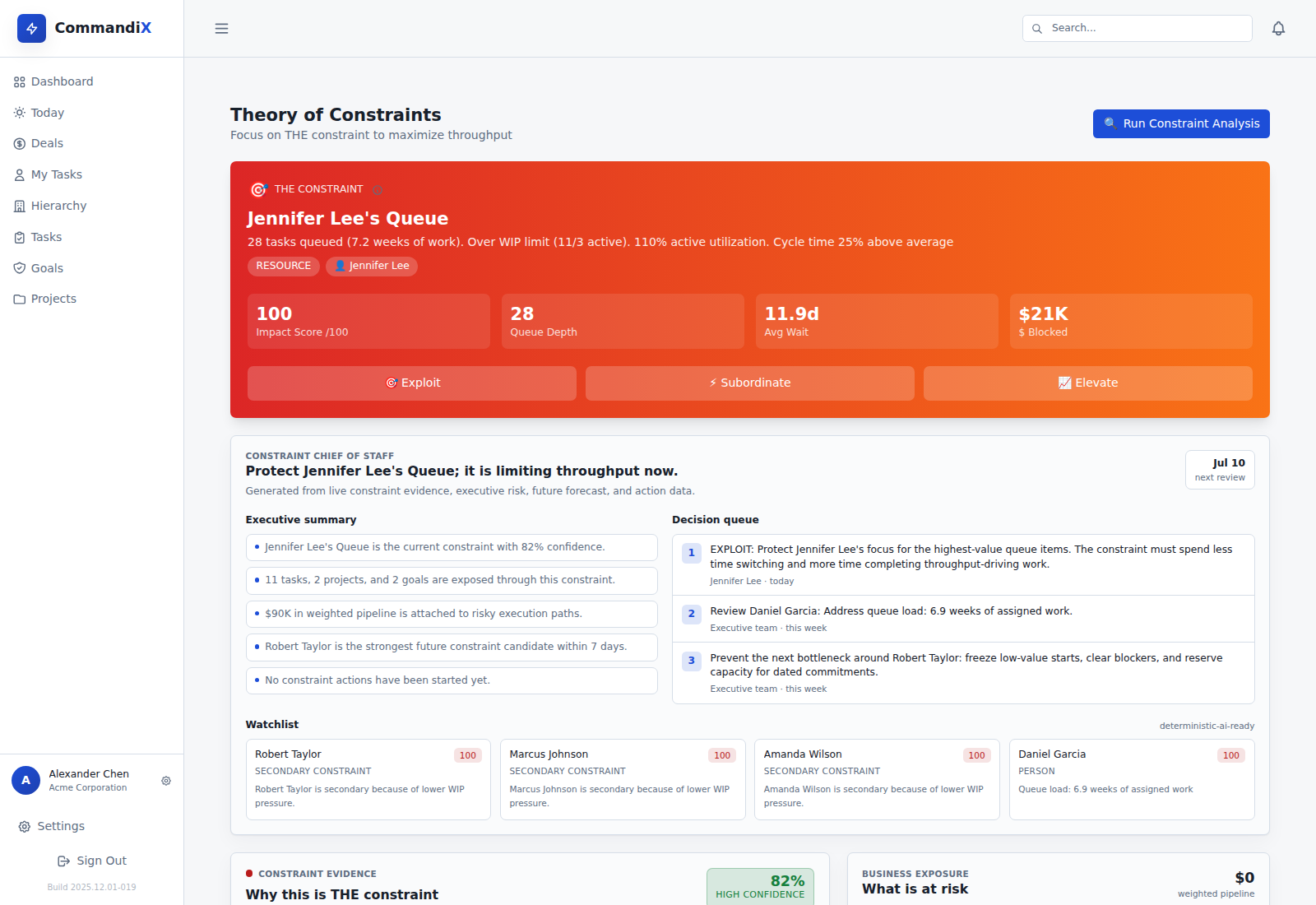
In Commandix, leaders can start from the executive dashboard, see the weak business signal, then drill into the constraint analysis page. That page names the active constraint and shows impact score, queue depth, average wait, and blocked value. The point is not to create a dramatic red card. The point is to give the team a shared target.

Bottleneck analysis template

The simplest useful template is brutally practical. It should fit into a weekly leadership review without becoming paperwork. Use it to force evidence, action, and follow-up.

Template fieldWhy it mattersCommandix evidence
Goal at riskPrevents local optimization around work that does not matter.Strategic goals, project links, revenue signal.
Suspected constraintNames the person, team, queue, policy, or dependency.Constraint card and workload dashboard.
Queue depthShows how much work is waiting behind the constraint.Queued tasks and active utilization.
Wait timeShows whether delay is becoming systemic.Average wait and aging work.
Blocked valueConnects operations to money and outcomes.Blocked value and exposed goals.
Action ownerTurns analysis into accountability.Exploit, subordinate, elevate actions.
Constraint analysis card
Constraint analysis cardCommandix names the active constraint and gives leaders impact, queue depth, wait time, and blocked value.

Examples of bottlenecks executives miss

A sales team may miss forecast because sellers are buried in internal follow-up tasks after demos. A project portfolio may slip because every initiative needs the same senior reviewer. Engineering may look slow because product decisions arrive late. Marketing may look inconsistent because campaign approvals wait behind one executive. Operations may look reactive because every urgent request bypasses prioritization.

None of these bottlenecks is solved by asking everybody to work harder. The fix depends on the type. A capacity bottleneck needs protected focus or more capacity. A dependency bottleneck needs earlier inputs or a changed handoff. A policy bottleneck needs a rule removed. A priority bottleneck needs leadership to stop feeding low-value work into the same narrow gate.

Blocker

Stops one item. Important, but often local.

Bottleneck

Slows a stream of work through one point.

Constraint

The bottleneck currently limiting the system goal.

Constraint action workflow
Constraint action workflowExploit, subordinate, and elevate actions turn bottleneck analysis into owned operating moves.

How to run the analysis in Commandix

Start with the executive dashboard. Find the goal, department, project, or revenue signal that is not moving. Open the constraint page and run constraint analysis. Look at the named constraint, but also inspect the evidence: queue depth, wait time, blocked value, and the work exposed through that constraint. Then open actions. Decide whether the right move is to exploit, subordinate, or elevate.

Exploit means protect the constraint. Remove interruptions, clean inputs, reduce context switching, and make sure the constrained resource works only on the highest-value queue items. Subordinate means align the rest of the system around the constraint. Stop flooding it. Pause lower-value work. Elevate means increase or redesign capacity only when the evidence says protection and subordination are not enough.

Fast win

Run one bottleneck review for one strategic goal. Do not redesign the company. Pick the goal that matters, find the constraint, assign one action, and measure next week.

Buyer comparison

Tool typeBest forRiskCommandix difference
Project managementOrganizing tasks and owners.Can show work without naming the system constraint.Connects work to goals, teams, sales, and constraint actions.
Kanban analyticsFlow metrics and process visibility.Can stay too operational for executives.Turns flow evidence into leadership decisions.
Resource planningCapacity forecasts and utilization.Can confuse local overload with system constraint.Separates workload from throughput impact.
CommandixExecutive bottleneck diagnosis.Requires leaders to act on the evidence.Shows constraint, action, owner, and business context in one loop.
Flow analytics evidence
Flow analytics evidenceCycle time, lead time, flow efficiency, CFD, and aging work help validate whether the bottleneck is historical or current.

Checklist for a serious bottleneck review

Before the meeting ends, confirm:

  • The constraint is named clearly enough that everyone understands it.
  • The evidence includes queue, wait, blocked value, and goal impact.
  • The action is one of exploit, subordinate, or elevate.
  • One person owns the action.
  • The next review will check whether throughput improved.
Workload dashboard
Workload dashboardWorkload distribution shows whether the constraint is a person, team, or queue problem.

Common mistakes to avoid

The first mistake is treating every delay as a bottleneck. A late task can be annoying without limiting the system. A true bottleneck restricts the flow of many valuable items. If leaders chase every red item, they dilute attention and teach the organization that escalation is the only way to get help. The review should separate ordinary noise from constraints that threaten goals, projects, or revenue.

The second mistake is assuming the bottleneck is always the busiest person. High workload matters, but it is not proof by itself. A person can be busy with low-value work while the real constraint is a decision queue somewhere else. Or the busiest person may be producing well while downstream work is waiting on approvals. That is why Commandix combines workload, flow, task, and goal evidence instead of relying on one metric.

The third mistake is skipping subordination. Leaders love elevation because it feels decisive: hire, buy, automate, add capacity. Sometimes that is correct. But TOC asks the company to exploit and subordinate first. Protect the constraint. Stop feeding it low-value work. Improve the quality of inputs. Only then decide whether the system genuinely needs more capacity.

How to make the template useful every week

Keep the weekly artifact small. One goal, one constraint, one action, one owner, one proof metric. A bloated bottleneck report becomes another document nobody reads. A small operating artifact becomes a management habit. The habit is what compounds. After several weeks, leaders begin to see patterns: recurring dependency queues, chronic policy delays, overloaded specialists, or teams that repeatedly become the constraint after planning season.

That pattern memory is where a bottleneck analysis tool becomes more valuable than a static template. The system remembers the evidence, not only the meeting conversation. Leaders can compare what they believed last week with what actually improved. If throughput did not change, the organization learns. If throughput did improve, the company has proof that focused action works.

Task board bottlenecks
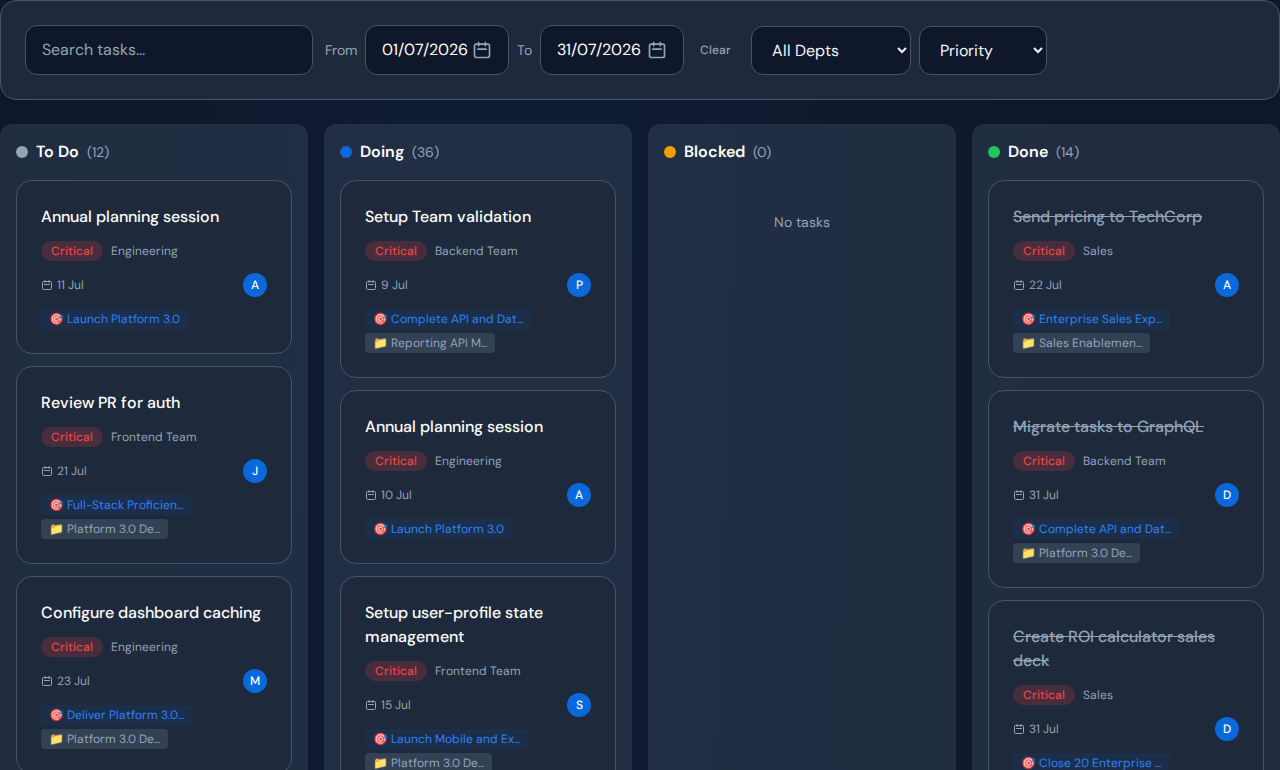
Task board bottlenecksTask status, blocked work, owners, and priorities provide the evidence behind the analysis.

Search intent: what the buyer really wants

People searching for a bottleneck analysis tool usually do not want theory first. They want relief. They have a process that is slower than it should be, a team that feels overloaded, a project that keeps slipping, or a revenue motion that looks busy but does not convert. The page must therefore give them both a method and a picture of the software workflow.

That is why the best content should include examples, a template, and product screenshots. A reader should leave knowing how to run the analysis manually if needed, but also seeing why a live operating system is stronger than a spreadsheet. The spreadsheet can record a bottleneck. Commandix can help detect it, connect it to goals, assign an action, and review the next signal.

For a fast-ranking post, this also matters commercially. The reader searching for examples may not be ready to buy, but the reader searching for a tool or software workflow is already problem-aware. Show both the education and the product path, and the article can serve search demand without becoming a generic glossary page.

The power of a bottleneck analysis tool is not the chart. It is the leadership behavior the chart creates. When the company can see the constraint, the conversation changes. People stop debating scattered symptoms. They start asking how to increase throughput. That is where execution gets faster.

See bottleneck analysis inside Commandix.

Open the live demo, run the constraint analysis, and follow the action workflow from signal to owner.

Open live demo

Frequently asked questions

What is a bottleneck analysis tool?

A bottleneck analysis tool helps leaders find where work is waiting, overloaded, blocked, or constrained so they can focus improvement on the point limiting throughput.

Is bottleneck analysis the same as project tracking?

No. Project tracking shows status. Bottleneck analysis explains which person, team, queue, dependency, or policy is limiting the system.

What should a bottleneck analysis template include?

It should include the goal at risk, suspected constraint, queue depth, wait time, blocked value, owner, next action, and proof that throughput improved.

See the operating system behind the article.Open Commandix demo